
Your AI can tell you what to buy.
This one places the order.
BrokerBridge researches your idea, builds the plan and checks it against your rules. When you approve, it sends the order to Interactive Brokers or NinjaTrader. Then the Journal shows you what is working.
Free to run on Mac and Windows. 10 free AI questions a day, credit packs from $10.You approve each trade, or approve a strategy up front. Your broker login stays on your computer.
What BrokerBridge is
The agentic trading platform
between AI and your broker.
AI can research and plan, but it stops at the answer. BrokerBridge is the layer that connects it to your brokerage account: it builds the plan, checks your rules, and sends the order when you approve.
AI
 Claude
 GPT
 Gemini
 DeepSeek
 Grok
 Kimi
 GLM

BrokerBridge
- Researches the idea
- Builds the plan
- Checks your rules
- Sends the order you approve
Your brokerage account
 Interactive Brokers
 NinjaTrader 8
 RobinhoodComing soon
 Charles SchwabComing soon
Watch one idea become a placed order.
The whole product in 80 seconds.
How it works
From trade idea
to placed order.
- 1
Send it any trade idea.
Paste an Instagram Reel, a YouTube video, a ticker or a hunch. BrokerBridge researches it and tells you what it would do, and why.
Recorded in BrokerBridge Chat. - 2
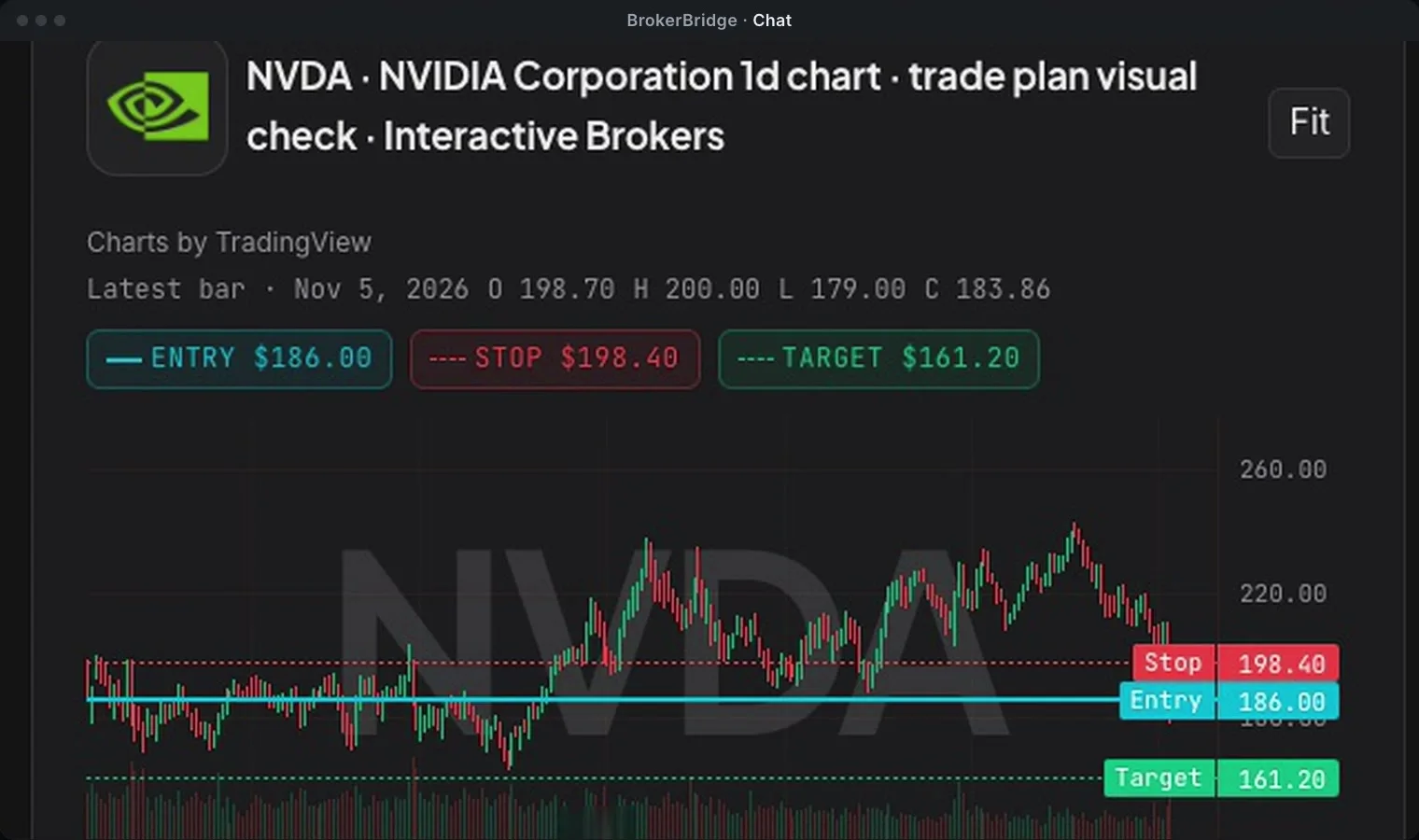
See the plan on a real chart.
Entry, stop and target, sized to your account. Move your stop on the chart. See the plan change before you place the trade.
Move the stop. See the plan change.Explore trade planning - 3
Approve it. Your broker places it.
Orders go to Interactive Brokers or NinjaTrader 8. Every order that opens or adds to a position runs through your risk checks first. Approve each trade yourself, or approve a saved strategy up front with limits you choose.
Your plan- Within your risk rules
- Sized to your account
- Approved by you
Your brokerInteractive BrokersNinjaTrader 8Paper or live. Your broker credentials stay on your computer. - 4
Learn what is working.
Your Journal finds the habits behind your results, like trading bigger right after a win.
Journal example: you trade more than twice as big right after a win.
Try an interactive example
BrokerBridgeYour trading workspaceHelp me plan a trade in AAPL.
Research → PlanTry the controls.
Explore trade planningSee Strategies and Journal
Set the rules and budget.
Inside the saved SPY setup
- Budget
- $10,000
- Chart
- 5 minutes
- Entry rule
- 10-bar average above 30-bar average
Example configuration captured in BrokerBridge: SPY, five-minute bars, $10,000 capital budget. Spy Trend is saved and Off. Its rules compare ten-bar and thirty-bar moving averages and include a regime filter.
Spot the pattern. Plan your next move.
| Previous trade | Avg. shares | Trades |
|---|---|---|
| After a win | 39.20 | 5 |
| After a loss | 17.88 | 8 |
Pause before an exit.
Trade Coach brings your plan back to one clear question.
“Is the stop or target hit, or has the setup changed?”Trade CoachSee the Coach answer
What you approve is exactly what gets placed.
When you approve an order, BrokerBridge locks its size, price and account. If any of them changes before it reaches your broker, it will not send. Approve it, and it goes to Interactive Brokers or NinjaTrader with the stop and target attached.
- I approve every trade
- You read the finished plan and approve that exact order.
- I confirm from the alert
- Name the conditions. When they hit, one tap sends it.
- I approve the strategy up front
- One strategy, with the money, symbols and hours you wrote down. Withdraw approval any time.
9 risk rules, written the way you would say them. 0 the AI can loosen.
- Most I’ll lose on one trade
- Stop for the day after I’m down this much
- Biggest position I’ll take
- Every trade needs an exit price
0 servers holding your broker login. It stays on your computer.
Give a direct trade instruction, review a draft, or authorize a saved strategy within your limits. How permissions work
What you get in the download.
- ChatAsk any AI about a trade. Get a plan sized to your account.
- JournalReplays your trades and finds the habit behind your results.
- StrategiesSaved strategies that trade inside the limits you set.
- AI PlaybookTurns videos, PDFs and web pages into rules your AI keeps.
- DashboardEvery position, its stop and your open risk in one view.
- AI ArenaA team of AI investors on one brief, with every reason written down.
- ScannersScans of the S&P 500, a sector or your own list. No AI credits used.
The Journal
Every trade has a lesson.
The Journal finds it.
BrokerBridge records every fill, lines your trades up and points at the habit costing you money, so your next plan can fix it.
- 2.2×bigger trades right after a winAfter a win39.20After a loss17.88
- 0 of 5of those bigger trades won
- −$397on trades after a win, vs +$70.08 after a loss
Journal example data.
How the Journal works
- 1Every fill, recordedFrom Interactive Brokers and NinjaTrader 8, automatically.
- 2Weekly replayYour plan next to what actually happened.
- 3Spot the patternBy size, time of day, hold time and setup.
- 4Carry it forwardSay yes once and the AI brings the lesson into your next plan.
Works with
Pick your AI.
Keep your broker.
Claude, GPT, Gemini, DeepSeek, Grok, Kimi or GLM on one side. Interactive Brokers or NinjaTrader 8 on the other, with Robinhood and Charles Schwab coming soon.

AI and broker connections shown.
Pick your AI
- Claude
- GPT
- Gemini
- DeepSeek
- Grok
- Kimi
- GLM
BrokerBridge
- Researches the idea
- Builds the plan
- Places the order
Broker and market connections
- Interactive Brokers
- NinjaTrader 8
- RobinhoodComing soon
- Charles SchwabComing soon
 PolymarketPrediction market tradingComing soon
Free to run on Mac and Windows.
Free to start: 10 AI questions a day on the free model, and a $100,000 Local account with simulated money. No broker needed.
Download freeNo subscription. Credit packs from $10 add more AI and turn on live trading. See pricing
A chatbot stops at the answer. BrokerBridge uses the same models, then does the rest: it reads your account, sizes the trade, checks your risk rules, places the order at your broker when you approve, and records what happened in your Journal.
Choose how Chat helps you trade.
Ask for research or a draft when you want to review an idea. A direct trade-now request can authorize one Local or paper order. For a saved strategy, choose its limits and approve it up front.
Start with Your first hour →Read how Chat permissions work →BrokerBridge does the work.
You make the call.
Free to run on Mac and Windows.